
AI and automation are rapidly transforming talent acquisition, turning once-manual bottlenecks into streamlined workflows. However, buying the latest recruiting software isn’t a silver bullet. To get a real return on investment, you have to apply these tools strategically.
Every organization faces unique hiring bottlenecks. Before adopting new technology, you need to diagnose your biggest pain points and map out your internal hiring process. Here is how to build a practical, high-impact AI recruitment strategy, starting with readiness and moving into the critical first stage of hiring: Operational Workforce Planning.
Step 1: Assess Your Organization’s Readiness
Before evaluating vendors or automating workflows, audit five core areas of your current talent acquisition (TA) setup to understand where technology will make the biggest difference:
Company Size & Budget: Medium-to-large enterprises generally see the fastest return on AI investments because they have the hiring volume, dedicated manpower, and budget to support implementation. Smaller teams can still benefit, though they should focus on lightweight, modular tools rather than heavy enterprise suites.
Hiring Volume & Target Workforce: Clarify your average annual headcount goals and candidate profiles. Are you doing high-volume (massive) hiring or specialized niche recruiting? Are you targeting tech talent or non-tech roles? High-volume, non-tech recruiting benefits heavily from automated screening and scheduling, while specialized tech hiring leans more on AI-powered sourcing and skills assessments.
Tech Stack & ATS Maturity: Check whether you already have an Applicant Tracking System (ATS) in place. Integrating AI into an existing ATS is relatively seamless, whereas automating recruitment without a centralized system is significantly harder and often creates data silos.
TA Team Capacity: Look at the size of your recruiting team relative to your company’s overall headcount. If a lean TA team is supporting a rapidly growing organization, automation becomes essential for survival rather than just a nice-to-have efficiency boost.
Recruitment Metrics & Bottlenecks: Audit your core TA metrics (such as Time-to-Hire, Cost-per-Hire, and Source-of-Hire) to pinpoint which stages consume the most time and why. Don't automate a broken process; target the exact stage causing the biggest delay.
Step 2: Map Your End-to-End Recruitment Process
Once you understand your readiness and primary pain points, map out your internal hiring lifecycle from start to finish. While workflows vary, a standard enterprise recruitment process breaks down into six core stages:
Operational Workforce Planning
Sourcing & Employer Branding
Screening & Assessment
Interviewing & Selection
Offer Management & Closing
Onboarding & Integration
To apply AI effectively, tackle these stages systematically - beginning at the very top of the funnel.
Deep Dive: Stage 1 – Operational Workforce Planning (OWP)
Before posting a single job description, you need a clear plan. Operational Workforce Planning (OWP) is the tactical execution of your staffing strategy over a short- to medium-term horizon (typically spanning a few weeks up to 12 months).
OWP aligns day-to-day employee schedules, shift rotations, and immediate hiring requisitions with approved budgets and real-time workload fluctuations. In short, it answers critical operational questions like: "Do we have enough engineers to ship the Q3 roadmap?".
The 6-Step Operational Workforce Planning Process
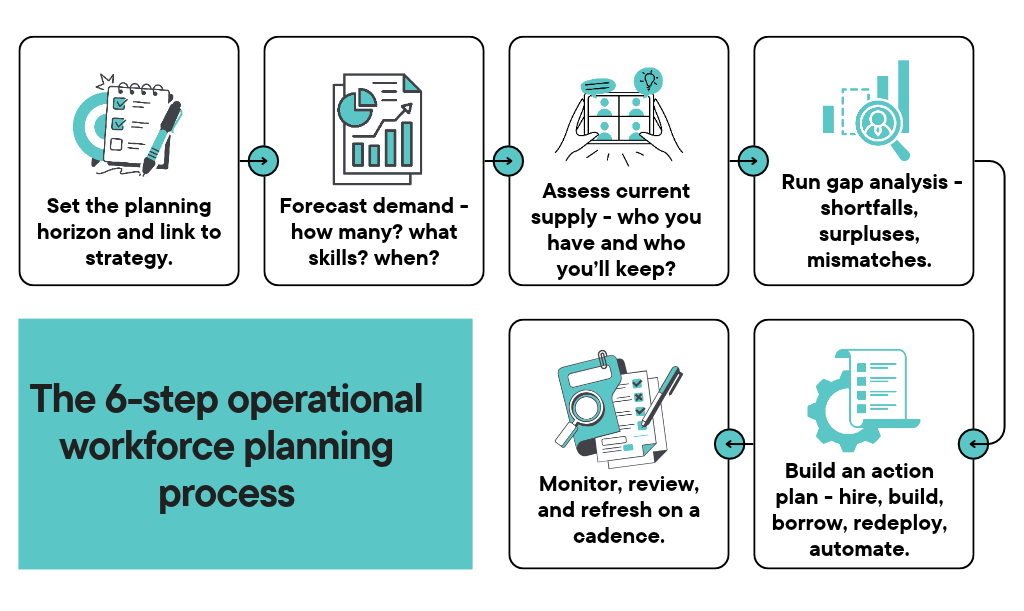
1- Set the Planning Horizon and Link to Strategy (Human-Led): Define your timeframe (next 3–12 months) and tie it to concrete business outcomes such as revenue targets, client projects, or product releases. Translate those goals into specific roles, skill sets, locations, and start dates.
Why keep it human: Deciding business priorities, product roadmaps, and revenue targets requires executive judgment and organizational context.
Light AI assist: You can use generative AI to summarize leadership meeting notes or translate high-level OKRs into draft role descriptions.
2- Forecast Demand (High AI Impact): Use workload models, sales pipelines, product roadmaps, or service volumes to estimate how many people you need, what skills they require, and when they need to start. Run base, optimistic, and conservative scenarios so your plan can flex if market conditions shift.
How to apply AI: Predictive analytics and machine learning models analyze historical sales pipelines, seasonal workload spikes, and project timelines to forecast exact headcount and skill needs. AI can instantly generate base, optimistic, and conservative staffing scenarios in seconds.
3- Assess Current Supply (High AI + Automation Impact): Pull a clean data snapshot from your HRIS detailing current headcount by role, level, location, skills, tenure, performance, and cost. Factor in expected attrition, retirements, internal transfers, and promotions to project your actual internal supply at the target date.
Automation: Automated data pipelines pull real-time headcount, tenure, and cost data directly from your HRIS without manual spreadsheet exports.
AI: Natural Language Processing (NLP) scans resumes, performance reviews, and project histories to build a live skills inventory (identifying hidden skills), while predictive attrition models flag flight-risk employees before they resign.
4- Run a Gap Analysis (High AI Impact): Compare your forecasted demand against projected supply to identify net shortfalls, surpluses, or skill mismatches. Prioritize these gaps based on business criticality and risk (such as hard-to-fill bottleneck roles or compliance-critical positions).
How to apply AI: AI-powered workforce intelligence platforms automatically cross-reference future demand against projected supply and external labor market benchmarks. They highlight critical skill shortages, flag bottleneck roles, and score risks based on how hard those roles are to fill in the current market.
5- Build an Action Plan (Moderate AI + High Automation Impact): Decide which lever to pull for each gap - external hiring, internal upskilling, contingent contractors, internal mobility, or workflow automation. Sequence your requisitions against budget constraints and lead times, assign owners, and stress-test the financial plan against potential hiring freezes or sudden spikes in demand.
AI: Recommends the most cost-effective lever for each gap (e.g., whether it is cheaper and faster to upskill an internal employee, hire a contractor, or open a full-time requisition) and simulates budget impacts.
Automation: Automatically triggers requisition approvals in your ATS, assigns recruiting owners, and notifies Finance when headcount plans are locked.
6- Monitor, Review, and Refresh (High Automation + AI Impact): Revisit your workforce plan at least quarterly (or whenever company strategy shifts). Update your underlying assumptions and track core KPIs like net workforce gap, time-to-fill, internal fill rate, and critical-role turnover to catch operational drift early.
Automation: Live HR dashboards automatically track your core OWP metrics (Utilization Rate, Overtime, Vacancy Rate, Labor-Cost Variance) in real time instead of waiting for quarterly manual reports.
AI: Anomaly detection sends proactive alerts when a metric drifts off track (e.g., "Engineering overtime has exceeded 15% for three straight weeks triggering a high risk of burnout and delayed Q3 delivery").
After all, while humans remain essential for setting strategy and direction, AI and automation take the lead when it comes to speed, accuracy, and execution.
Up Next in Part 2: Once your workforce plan is locked in, how do you attract and filter the right talent without drowning in resumes? In the next post, we’ll break down Stage 2 (Sourcing & Employer Branding) and Stage 3 (Screening & Assessment) and show you where AI saves recruiters hours every week. Stay tuned!
